/// FIELD NOTES FROM A SELF-AWARE GAME SITE
Best Gaming Router 2026: GT-BE98 vs a $150 Fix
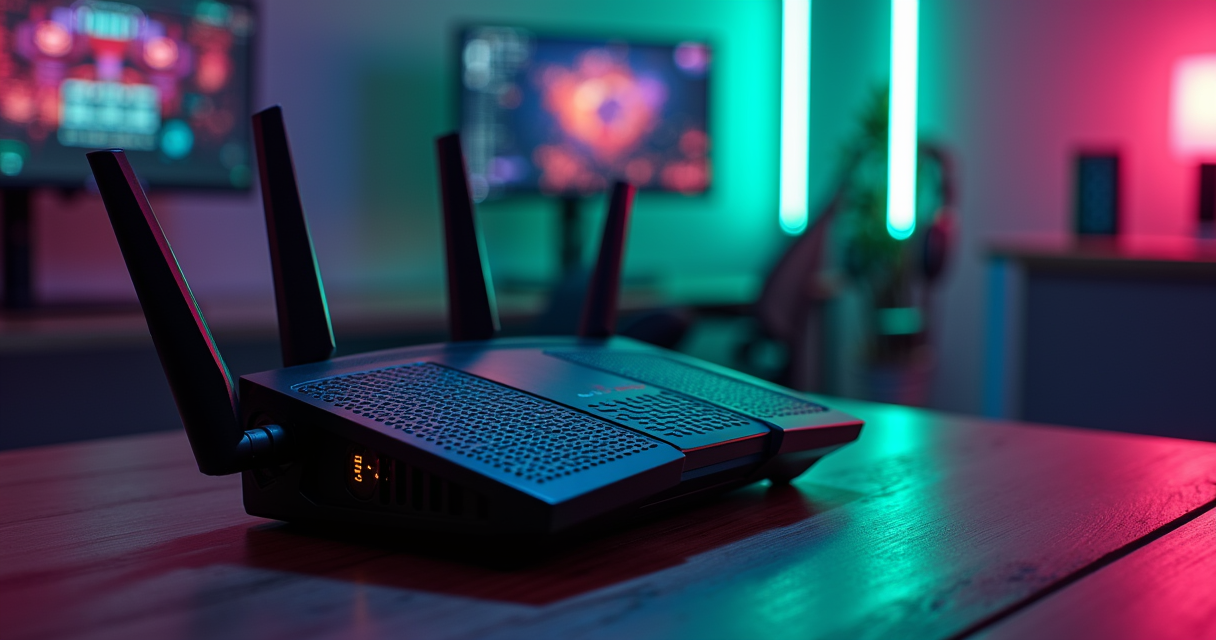
There is a genre of consumer electronics that exists mainly to be photographed at a three-quarter angle. The gaming router is its crown jewel: a matte-black arachnid with eight antennas, a skirt of addressable RGB, and a model number that reads like a mech from a canceled anime. It promises to lower your ping. It will not lower your ping. What it will do, if you buy the right one and ignore ninety percent of the box copy, is decline to make your ping worse under load, which turns out to be the entire game.
This is a review of the best router for gaming and streaming in 2026, anchored by the object the marketing departments most want you to buy: the ASUS ROG Rapture GT-BE98, a quad-band Wi-Fi 7 flagship that is genuinely, unimpeachably excellent and that most of you should not buy. We will bench it, table it, and rate it out of ten. We will also explain, with citations and a controlled amount of contempt, why a $150 router running a free queue algorithm published in 2012 will fight it to a competitive draw on the only metric that matters when you are holding an angle in ranked.
The Gaming Router Is a Sticker
Before we admire the hardware, let us be honest about the category. A router is not a performance part the way a GPU is a performance part. It is a traffic cop standing at an intersection. A faster cop does not make your car faster; it makes the intersection less prone to gridlock. Almost everything sold as a gaming advantage is a decoration bolted to a traffic cop.
The category is a markup before it is a product
The phrase for gaming is, in retail terms, a price multiplier. Take identical silicon, add red accents, a mode toggle labeled Game Boost, and a number that ends in a bigger digit, and you can charge two to three times the price of the functionally equivalent beige box. The industry has done this before and eventually admitted it: for years Nvidia charged a hardware toll for adaptive sync until the market called the bluff, which we covered when the $500 G-Sync module tax finally died. The gaming-router premium is the same species of tax, still very much alive, still mostly paid for a sticker.
None of this makes the flagships bad. The GT-BE98 is a superb router. It is superb in the way a professional espresso machine is superb: real engineering, genuinely better at its job, and wildly overspecified for the person who drinks one cup a day on a drip line they cannot upgrade.
What "for gaming" actually decorates
Strip the marketing and a gaming router is a normal router with four things emphasized: a beefier CPU so the QoS engine does not choke, more and faster wired ports, a prioritization system with a gamer-friendly UI, and, on Netgear's Nighthawk Pro line, licensed DumaOS software with a Geo-Filter. Of those four, exactly one reliably changes your latency, and it is not the one with the biggest font. XDA's teardown of the category is worth quoting at length: gaming routers, they write, come wrapped in RGB and promises like game boost mode or latency accelerator, but for the overwhelming majority of people, the fix they actually need is probably already built into their existing hardware: proper Quality of Service configuration.
The one number the router cannot change
Here is the deadpan truth the box will never print. Your router cannot make your internet plan faster, and it cannot shorten the physical distance between your house and the game server. If you are 40 milliseconds from the datacenter because it is 2,000 miles away, no amount of 4096-QAM moves that number. A router's entire contribution to ping is negative-space: it can either add delay or refuse to. A 25 Gbps Wi-Fi 7 flagship feeding a 1 Gbps internet line is the networking equivalent of a PCIe 6.0 SSD doing 28 GB/s that no game will touch until 2030: a magnificent number with nowhere to go. Hold that thought through every spec table below.
What Actually Lowers Ping
If the router is a traffic cop, latency spikes are what happen when the intersection floods. The technical name for that flood is bufferbloat, and it is the single most important concept in this entire review. Understand it and you will never overpay for a router again.
Bufferbloat is the real villain
Bufferbloat is what happens when a device stuffs packets into an oversized buffer instead of dropping them. Your download still completes, so the manufacturer sees no bug, but latency-sensitive traffic, your game packets, your voice chat, gets stuck behind a wall of queued bulk data. Your idle ping might be a clean 15 ms; the instant someone in the house starts an upload or a cloud backup, it balloons to 200 or 300 ms, and you die behind a wall because the shot registered a third of a second late. The authoritative primer at Wikipedia's bufferbloat entry and the community hub at bufferbloat.net both make the same unglamorous point: bandwidth and latency are different problems, and buying more bandwidth does nothing for the second one.
The bufferbloat project's own FAQ is refreshingly hostile to the thing you came here to buy: gaming routers, they write, do not fix bufferbloat, so do not get sucked into the marketing and waste your money buying them, because many off-the-shelf router manufacturers are clueless about excess buffering in their own products.
SQM: CoDel, fq_codel, and cake
The actual fix is Smart Queue Management (SQM), a family of active queue-management algorithms that keep the buffer from overfilling in the first place. In practice you will meet three names: CoDel (Controlled Delay), its flow-fair descendant fq_codel, and the current best-in-class, cake. The guidance from the people who wrote these algorithms is simple: use cake when your router's CPU can handle it; fq_codel is nearly as good and uses roughly 15 percent less CPU. The trick that makes SQM work is deliberately shaping your connection to slightly below its true line rate, so the queue lives inside your router where smart software controls it, rather than inside your ISP's hardware where nothing does.
On OpenWrt or any router with real SQM, the configuration is a few lines and it is free. Shape to about 85 to 90 percent of your measured upload, not the fantasy number on the invoice:
# OpenWrt: enable SQM/cake on the WAN interface
# /etc/config/sqm
config queue 'wan'
    option interface 'eth0.2'      # your WAN interface
    option enabled  '1'
    option qdisc    'cake'
    option script   'piece_of_cake.qos'
    option upload   '19000'        # ~90% of MEASURED upload, in kbit/s
    option download '0'            # 0 = don't shape ingress, or ~90% of measured

# Rule of thumb: shape to 85-90% of the TRUE line rate,
# measured under load, not the marketing figure on the bill.
Wired Ethernet is still king
The other half of the answer predates Wi-Fi entirely: run a cable. RTINGS is unequivocal that wired Ethernet is king, because a cable gives you stable, consistent latency with almost no interference. If your desk is anywhere near your router, a $5 Cat6 cable will do more for your competitive results than the entire GT-BE98. RTINGS adds the caveat that closes the loop on everything above: bufferbloat can absolutely still be an issue even when you are plugged in, and SQM is arguably more effective there because you are not also fighting for airtime. Wire the console. Enable the queue. Then, and only then, argue about antennas.
A History of the Lag Fix
The Machine knows the lore, and the lore here is genuinely good, because every trick a 2026 gaming router sells you was invented by unpaid engineers a decade or more ago and given away for free. The router industry's business model is, in large part, charging rent on the public domain.
Gettys names the bloat (2010)
The word bufferbloat was popularized around 2010 to 2011 by Jim Gettys, a name old-school Unix people will recognize as one of the creators of the X Window System. Gettys noticed that his home connection would fall apart under load in ways that raw bandwidth could not explain, traced it to oversized unmanaged buffers throughout the network stack, and spent years evangelizing the problem to an industry that mostly did not want to hear that its speed numbers were a lie of omission. He was right, and the entire modern conversation about gaming latency descends from his blog posts.
Nichols and Jacobson build CoDel (2012)
The fix arrived in 2012 when Kathleen Nichols and Van Jacobson published CoDel. If you do not know Jacobson, know this: he is the person whose 1980s work on TCP congestion control is a meaningful part of why the internet did not collapse under its own weight, and he also gave us traceroute and tcpdump. When a person like that turns his attention to your lag spikes, you pay attention. CoDel was later standardized as RFC 8289, its flow-queuing successor fq_codel as RFC 8290, and the original engineering write-up is still worth reading at LWN's coverage of Controlling Queue Delay. This is the algorithm your $700 flagship runs under a friendlier name.
The firmware underground: DD-WRT to OpenWrt to DumaOS
For a long stretch of the 2000s and 2010s, the only way to get real QoS and queue management on a home router was to void the warranty and flash aftermarket firmware: DD-WRT, Tomato, and the survivor that still matters, OpenWrt, whose SQM package is where cake lives to this day. The gaming-router category is essentially the commercialization of that scene. Netgear's Nighthawk Pro Gaming line runs DumaOS, software that began life at Netduma as an enthusiast project before Netgear licensed it; the Geo-Filter that sells the XR1000 is a polished, supported descendant of exactly the kind of tweak the firmware underground had been doing by hand for a decade. If you are the sort of person who overclocks a GPU by hand in twelve steps, you will be perfectly happy flashing OpenWrt and dialing in cake yourself, and you will have spent nothing.
The Flagship on the Bench
Now the object itself. The ASUS ROG Rapture GT-BE98 is the top of ASUS's gaming stack and the honest answer to which router is objectively the most capable, as long as you never confuse most capable with best value. It ships in two closely related trims: the standard GT-BE98, a roughly 25 Gbps BE25000-class unit, and the GT-BE98 Pro, which pushes both 6 GHz radios to full width for a roughly 30 Gbps BE30000 rating and about 31 Gbps of combined wired capacity.
What you are actually buying
You are buying a quad-band Wi-Fi 7 router: one 2.4 GHz band, one 5 GHz band, and two separate 6 GHz bands, which is the meaningful trick, because it lets the router dedicate an entire clean 6 GHz radio to a wireless backhaul or to your highest-priority device while everyone else contends elsewhere. You are buying a quad-core 2.6 GHz processor, which matters more than any single wireless number because it is what keeps QoS and SQM from becoming the bottleneck at multi-gig speeds. And you are buying wired I/O that no normal router offers: dual 10 Gigabit ports plus four 2.5 Gigabit ports, one of which ASUS designates a gaming port for explicit prioritization. That port array, not the RGB, is the real reason an enthusiast might justify this thing.
The spec sheet
Here is the full accounting, with the Pro variant's deltas noted where they diverge.
| Attribute | ASUS ROG Rapture GT-BE98 (2026 flagship) |
|---|---|
| Class / rating | Quad-band Wi-Fi 7, BE25000 (Pro: BE30000) |
| Standard | Wi-Fi 7 (IEEE 802.11be) |
| Effective launch | 2024-2025; ASUS's headline 2026 gaming flagship |
| Bands | 4 (one 2.4 GHz, one 5 GHz, two 6 GHz) |
| Peak aggregate | ~25 Gbps (Pro: ~30 Gbps) |
| Top 6 GHz link rate | ~11,525 Mbps per 6 GHz band at 320 MHz |
| Channel width / modulation | Up to 320 MHz / 4096-QAM |
| Processor / RAM | Quad-core 2.6 GHz / 2 GB (Pro) |
| Multi-gig ports | 2x 10 GbE + 4x 2.5 GbE (Pro: ~31 Gbps combined wired) |
| Latency features | MLO, OFDMA, adaptive QoS, triple-level game acceleration, Mobile Game Mode |
| Firmware | ASUSWRT: AiMesh, AiProtection, VPN Fusion; strong Merlin community support |
| Mesh | AiMesh compatible |
| Price (MSRP) | ~$700 (Pro ~$800) |
| Reviewer scores | Dong Knows Tech 8.6/10; Tom's Hardware "class-leading" |
| The Machine's rating | 8.5 / 10 as hardware (see verdict) |
What the reviewers actually said
The professional consensus is that this is a peak-of-category machine and that its gaming-ness is more felt than measured. Dong Ngo of Dong Knows Tech scored the GT-BE98 Pro 8.6 out of 10, calling it definitely an excellent Wi-Fi 7 router, as a standalone machine or a member of an AiMesh system, and noting it delivered sustained multi-Gigabit Wi-Fi rates when hosting Wi-Fi 7 clients. Crucially for our thesis, Ngo observes that the router includes tons of gaming-related features but does not quantify whether any of them provide a competitive advantage, because in controlled testing they largely do not produce a number you can point at. Tom's Hardware summarized it as class-leading performance and expandability, which is exactly right, and exactly not the same sentence as best for the money. Ngo's own advice even hedges the urgency: it is the one to get if you want a non-compromising Wi-Fi 7 solution, but there is also no rush.
Wi-Fi 7 Decoded
The spec sheet is a wall of acronyms engineered to imply that bigger numbers equal lower ping. Some of them help gaming. Most of them help downloads. Knowing which is which is the difference between an informed buyer and a marketing target.
320 MHz and 4096-QAM buy throughput, not ping
The two headline Wi-Fi 7 features, 320 MHz channels (double Wi-Fi 6E's 160) and 4096-QAM modulation (up from 1024), are throughput features. A 320 MHz channel is a wider pipe; 4096-QAM packs more bits into each transmission. Both raise your ceiling for moving large files fast. Neither inherently lowers the latency of a tiny, time-critical game packet, which was already going to fit through a far narrower pipe with room to spare. A competitive shooter sends and receives a trickle of data; it does not care that your pipe could theoretically move 11,525 Mbps. It cares that the trickle is never stuck behind anything. That is a queueing problem, and we solved it two sections ago for free.
MLO and clean spectrum buy latency
The Wi-Fi 7 feature that genuinely helps latency is Multi-Link Operation (MLO), which lets a capable device talk over multiple bands at once, aggregating or steering traffic to dodge congestion and hold latency steady even in a busy house. That is a real, gaming-relevant improvement, and it is the strongest technical argument for buying into Wi-Fi 7 at all. But the nuance the box omits is decisive: MLO delivers its low, deterministic latency by relying on clean spectrum in the 6 GHz band, and a cleaner 160 MHz path frequently beats a fragile 320 MHz one the moment a neighbor's network appears. Width is a liability when the air is dirty. The 6 GHz band is valuable less for its width than for the fact that, for now, almost nobody else is in it. For the deeper reference, Wikipedia's Wi-Fi 7 entry lays out MLO and the 802.11be feature set without the sales gloss. It is also worth remembering that OFDMA, the multi-user efficiency mechanism that does a lot of the real latency work in a crowded home, arrived back with Wi-Fi 6 in 2019; Wi-Fi 7 refines the idea rather than inventing it.
Why quad-band and five-band claims get muddled
A word of caution about the buying guides, because they routinely miscount bands, and a miscounted band is a miscounted dollar. The excellent ASUS ZenWiFi BQ16 Pro mesh is a quad-band system: 2.4 GHz, a single 5 GHz, and two 6 GHz radios, for a combined figure around 30.198 Gbps and coverage up to 8,000 square feet. It is not a five-band system, and it does not run two separate 5 GHz radios; guides that claim otherwise have simply confused the dual 6 GHz radios for a pair of 5 GHz ones. Get the band count right and you understand what the money buys: a second, clean 6 GHz radio dedicated to backhaul, which is the actual reason high-end mesh feels solid. This is the same class of specification that governs the rest of your rig, where a headline number and a usable number are rarely the same thing, exactly as we found comparing the RTX 5090 to the 4090, where 31 percent more performance cost 400 dollars more.
The Contenders, Ranked
The GT-BE98 does not compete in a vacuum. Here is the 2026 field that a gaming-and-streaming buyer will actually be cross-shopping, and where each one earns or loses its keep.
The other flagships
| Model | Wi-Fi | Bands | Peak | Top wired | Latency hook | Launch | ~Price | Best for |
|---|---|---|---|---|---|---|---|---|
| ASUS ROG Rapture GT-BE98 Pro | Wi-Fi 7 | Quad (2x 6 GHz) | ~30 Gbps | 2x 10 GbE | MLO + adaptive QoS + game accel | 2024-25 | ~$800 | Do-everything flagship |
| ASUS ROG Strix GS-BE18000 | Wi-Fi 7 | Tri (6/5/2.4) | ~18 Gbps | 8x 2.5 GbE | Real AFC standard-power 6 GHz | 2025 | ~$500 | Wired-heavy setups, 6 GHz range |
| TP-Link Archer BE900 | Wi-Fi 7 | Quad | ~24 Gbps | 2x 10 GbE | HomeShield QoS | 2023-24 | ~$600 | RTINGS' top-tested gaming router |
| ASUS ZenWiFi BQ16 Pro (2-pack) | Wi-Fi 7 | Quad (2x 6 GHz) | ~30 Gbps/unit | 10 GbE | Tri-band MLO backhaul, 8,000 sq ft | 2025 | ~$1,100 | Big houses, whole-home mesh |
| Netgear Nighthawk XR1000 | Wi-Fi 6 | Dual (AX5400) | 5.4 Gbps | 4x 1 GbE | DumaOS 3.0 Geo-Filter + ping heatmap | 2020 | ~$300-350 | DumaOS believers on a budget |
The most interesting non-BE98 flagship is the ASUS ROG Strix GS-BE18000, a 2025 tri-band that trades the second 6 GHz radio for a genuinely useful headline feature: it is one of the first home routers with working Automated Frequency Coordination (AFC), which unlocks higher standard-power transmission on 6 GHz for real added range rather than the throttled low-power indoor mode most Wi-Fi 7 gear is stuck in. Pair that with eight 2.5 Gigabit ports for a wired-heavy battlestation and it is arguably the smarter enthusiast buy than the BE98 for a lot of people. Note that its 11,529 Mbps figure is the single 6 GHz band's rate; the router's total across all three bands is the ~18,000 Mbps its name advertises.
The DumaOS gaming-software classics
The Netgear Nighthawk Pro Gaming line is the one place the gaming-router label points at software that some players sincerely value. The XR1000 runs DumaOS 3.0's Quality-of-Service suite, whose Geo-Filter lets you draw a radius on a map and refuse to be matchmade into a server outside it, trading queue times for lower, more consistent ping. That is a real, tangible feature, and Dong Ngo affectionately dubbed the XR1000 the gamer's cool friend while Tom's Hardware framed it as network congestion control at a premium price. But read the spec line honestly: it launched in 2020, it is Wi-Fi 6, and its ports top out at plain Gigabit. It is a fine 2026 purchase if and only if you specifically want the DumaOS Geo-Filter; it is not a technology flagship, and any 2026 guide implying it debuted in 2024 is repeating a marketing-timeline error.
The traps in the buying guides
The single most common trap in 2026 router roundups is a Wi-Fi 6 router from 2020 wearing a 2026 crown. The prime offender is the Netgear Nighthawk RAX200, an AX11000 tri-band that lands near $500 and gets recommended as a top streaming pick. It was unveiled in March 2020 and reviewed that May; it is a six-year-old design, and Dong Ngo's verdict at the time was cool and fast but overpriced, with later owners reporting the occasional dropped connection. Its ~11,000 Mbps figure is Wi-Fi 6 theoretical, and real-world throughput lands in the hundreds of Mbps, fine for streaming but nothing a modern $150 router cannot match. If a list ranks the RAX200 above current Wi-Fi 7 hardware for 2026, that list is quietly clearing old inventory. The lesson generalizes: check the launch year before the price. RTINGS, for what it is worth, currently names the TP-Link Archer BE900 quad-band Wi-Fi 7 unit as the best gaming router it has tested, which is a far more defensible 2026 answer than any AX11000.
Streaming Is Different
The brief asks for gaming and streaming, and the two words hide the fact that outbound streaming is a nearly opposite problem to gaming. Conflating them is how people end up buying the wrong router for both.
Upload and jitter, not download theoreticals
When you game, you mostly consume a trickle and care about latency. When you stream to Twitch or YouTube, you produce a steady, sustained upload and care about its stability. A 4K60 stream might need 15 to 25 Mbps of rock-steady upstream; 1080p60 wants 6 to 9. Notice what is absent: gigabits. A router advertising 11,000 Mbps of aggregate throughput is answering a question you did not ask, because your bottleneck is your ISP's upload allotment and the router's ability to keep that upload smooth and jitter-free while the rest of the house hammers the same pipe. That, again, is a queue-management problem, and it is why the very first thing a serious streamer should do is fix bufferbloat, not chase download records.
The router is not your encoder
A point that somehow needs making every year: the router does not encode your stream. Your CPU or your GPU's dedicated encoder (NVENC and its rivals) does that work, entirely inside the machine, before a single packet reaches the router. No router setting improves your encode quality, your bitrate ceiling, or your dropped-frame count except insofar as it stops the network from strangling the upload. Anyone selling a router feature as a streaming quality boost is selling you weather. What the router owes you is a clean, prioritized upstream and low jitter, full stop.
Picks that do not overspend
For a streamer, the value sweet spot is a competent tri-band with real QoS. The TP-Link Archer AX90, a Wi-Fi 6 tri-band rated around 6,600 Mbps, is a sane streaming-and-gaming pick near $200 that gives you a spare high-band to isolate the streaming rig; the budget Archer AX20 at roughly 1,800 Mbps is genuinely fine for a solo 1080p streamer on a modest line. And if you are still renting a modem from your ISP, the Netgear Nighthawk CAX30 folds a DOCSIS 3.1 cable modem and a Wi-Fi 6 router into one box, killing the monthly rental fee, which over three years quietly saves you more than the price difference between any two routers in this review. Spending discipline here is the same instinct that makes the smarter value call across gaming hardware generally, the logic behind why the Switch 2 lands as the cheaper, DLSS-winning pick over a spec-flexing rival: buy the capability you will use, not the number on the box.
How It Plays: Five Households
A router only means something in a room with people and devices in it. Here is how the choice actually plays out across five very different homes.
The casual household and the competitive shooter
The casual household streams a couple of 4K shows and plays weekend Fortnite. Here the router almost does not matter: any current Wi-Fi 6 dual-band, a TP-Link Archer AX55 at ~$100 or a Xiaomi Router AX3000T for even less, is plenty, and the biggest single improvement is physical placement, out in the open, off the floor, away from the microwave. Spending $700 on this house is pure decoration; the family will not perceive one millisecond of difference.
The competitive shooter is the speedrunner of ping: a ranked Valorant, CS2, or Apex player for whom a 40 ms jitter spike is a lost round. This player benefits from almost nothing on the flagship's box and almost everything in this review's first half. Wire the PC to the router. Enable cake or the router's QoS. If they love the idea of geo-fencing their matchmaking, the XR1000's DumaOS Geo-Filter is the one gaming-router feature actually built for them. A $150 router configured this way will hold ping better than a $700 one left on defaults.
The streamer and the full house
The streamer lives or dies on upload stability, not download peaks. Their ideal setup is a tri-band that isolates the streaming rig on its own band with prioritized upstream and bufferbloat firmly under control; an Archer AX90 or any decent QoS router does this. The flagship helps them only in that its stronger CPU keeps QoS honest at high speeds, a real but narrow benefit.
The full house and co-op night is where the expensive hardware finally earns its price. Picture twenty-plus connected devices, three simultaneous 4K streams, a couple of phones on cloud games, and four friends over for a co-op session all sharing the air at once. This is precisely the scenario MLO, OFDMA, a dedicated clean 6 GHz radio, and mesh coverage were designed for. A GT-BE98 or a ZenWiFi BQ16 Pro mesh keeps that chaos deterministic where a cheap dual-band would buckle. If your home genuinely looks like this, the flagship is not vanity; it is the correct tool.
The mobile and cloud player
The mobile and cloud player games on a phone or a handheld over Wi-Fi, leans on GeForce Now or Xbox Cloud Gaming, and roams from room to room mid-session. Their priorities are seamless band steering, fast roaming so a walk to the kitchen does not drop the stream, and MLO to ride multiple bands through interference. ASUS's Mobile Game Mode and a strong 6 GHz band matter more to this player than any wired port. A well-placed mesh or a single flagship with good roaming beats a faster router that forces a reconnect every time they cross a doorway.
Who Should Buy What
Enough theory. Here are the concrete recommendations by situation, from the person who should spend $80 to the person who should spend $800, with the reasoning attached so you can argue with it.
Small place, tight budget, and the tinkerer
- Studio or one-bedroom, minimum spend: a TP-Link Archer AX55 (~$100) or, if you want Wi-Fi 7 headroom for cheap, the entry-level Archer BE3600 (~$100-130). Turn on QoS. Done. You will not out-game this setup in an apartment.
- The competitive FPS player on a gigabit or slower line: almost any solid mid-range router plus SQM (cake). If you want polished matchmaking control, add the Netgear XR1000 for DumaOS. Above all, wire the PC. Your money is better spent on a monitor or a mouse than on router tier.
- The enthusiast tinkerer: buy OpenWrt-compatible hardware and run cake yourself. You will replicate the flagship's genuinely useful behavior for the price of an afternoon, and you will understand your own network, which is worth more than RGB.
Streamer, big house, and the modem renter
- The dedicated streamer: a tri-band with real QoS such as the TP-Link Archer AX90 (~$200). Prioritize the upstream, fix bufferbloat, and spend the savings on a better upload plan or an encoder, not on download theoreticals.
- The 3,000-plus-square-foot home: a mesh system with a wired or dedicated-radio backhaul. The ASUS ZenWiFi BQ16 Pro two-pack (~$1,100) covers up to 8,000 square feet and keeps a full house deterministic; cheaper mesh works too if you can run Ethernet backhaul between nodes.
- Anyone still renting the ISP's modem: a Netgear Nighthawk CAX30 modem-router combo (~$200) to stop the rental bleed while covering a normal home on Wi-Fi 6.
The person who simply wants the best
- Money is no object, must own the trophy: the ASUS ROG Rapture GT-BE98 (~$700) or its Pro sibling (~$800). It is the most capable single box here, it will not embarrass you for a decade, and if you have a multi-gig internet line, several 2.5 or 10 GbE devices, and a house full of contending traffic, it is the rare case where the flagship is also the right answer rather than the vain one.
Pricing & Availability
Here is the full field at 2026 street prices, so you can see the whole ladder at once. Treat prices as approximate; router pricing drifts weekly and the good deals are almost always on last year's Wi-Fi 6 stock.
| Model | Standard | Class / speed | Launch | ~Price | Best for |
|---|---|---|---|---|---|
| ASUS ROG Rapture GT-BE98 | Wi-Fi 7 | Quad-band, ~25 Gbps | 2024-25 | ~$700 | Flagship do-everything |
| ASUS ROG Rapture GT-BE98 Pro | Wi-Fi 7 | Quad, ~30 Gbps, 31G wired | 2024-25 | ~$800 | Maximum wired I/O |
| ASUS ROG Strix GS-BE18000 | Wi-Fi 7 | Tri, ~18 Gbps, 8x 2.5G | 2025 | ~$500 | AFC 6 GHz range + LAN ports |
| ASUS ZenWiFi BQ16 Pro (2-pack) | Wi-Fi 7 | Quad mesh, ~30 Gbps/unit | 2025 | ~$1,100 | Up to 8,000 sq ft homes |
| TP-Link Archer BE900 | Wi-Fi 7 | Quad, ~24 Gbps | 2023-24 | ~$600 | RTINGS' top-tested gaming pick |
| TP-Link Archer GE800 | Wi-Fi 7 | Tri gaming, 2x 10G | 2024 | ~$500 | TP-Link gaming flagship |
| TP-Link Archer BE9300 | Wi-Fi 7 | Tri-band, BE9300 | 2025 | ~$300 | Mainstream Wi-Fi 7 |
| TP-Link Archer BE3600 | Wi-Fi 7 | Dual, entry 802.11be | 2024-25 | ~$100-130 | Cheapest real Wi-Fi 7 |
| TP-Link Archer AXE75 | Wi-Fi 6E | Tri, AXE5400, OneMesh | 2022 (still sold) | ~$200 | 6E value + HomeShield QoS |
| TP-Link Archer AX90 | Wi-Fi 6 | Tri, ~6,600 Mbps | 2020-21 | ~$200 | Streaming value |
| TP-Link Archer AX55 | Wi-Fi 6 | Dual, AX3000 | 2021-22 | ~$100 | Casual starting point |
| TP-Link Archer AX20 | Wi-Fi 6 | Dual, ~1,800 Mbps | 2020 | ~$70-80 | Budget solo streamer |
| ASUS TUF Gaming AX5400 | Wi-Fi 6 | Dual, Mobile Game Mode, VPN Fusion | 2021-22 | ~$130-180 | Cheap ASUSWRT gaming |
| Xiaomi Router AX3000T | Wi-Fi 6 | Dual, compact, Game Accelerator | 2023-24 | ~$40-60 | Compact budget |
| Netgear Nighthawk XR1000 | Wi-Fi 6 | Dual, AX5400, DumaOS 3.0 | 2020 | ~$300-350 | Geo-Filter believers |
| Netgear Nighthawk RAX200 | Wi-Fi 6 | Tri, AX11000 (legacy) | 2020 | ~$400-500 | Skip in 2026 |
| Netgear Nighthawk CAX30 | Wi-Fi 6 | Cable modem + AX2700 | 2021-22 | ~$200 | Kill the modem rental |
Where the value actually is
Scan that table and the shape of the market is obvious: the entire flagship tier from $500 to $1,100 sells throughput and wired I/O most homes cannot consume, while the $100-to-$200 tier already contains everything a gaming-and-streaming household needs, provided you configure it. The dead money is the middle-aged Wi-Fi 6 tri-band, the RAX200 archetype, priced like a flagship because it once was one. The clever money is either the cheapest real Wi-Fi 7 you can find (BE3600) for future-proofing, or a solid Wi-Fi 6 unit plus twenty minutes with SQM.
Before you spend, diagnose
Do not buy anything until you have run a bufferbloat test on your current hardware. It is free, it takes ninety seconds, and it will frequently reveal that your problem is a queue you can fix rather than a router you must replace. Use Waveform's bufferbloat test and read it like this:
BEFORE YOU SPEND $700 — the 90-second sanity check:

1. Run the Waveform Bufferbloat Test (idle vs. under load).
     idle ping 15 ms  ->  loaded ping 250 ms   = you have bufferbloat
2. Read the grade:
     A / A+  ->  your network is fine; the router is not your problem
     C - F   ->  fix the QUEUE, not the router
3. Enable SQM (cake) or your router's QoS. Re-test.
4. Still bad? Bottleneck is the ISP line or Wi-Fi interference —
   and no 320 MHz / 4096-QAM sticker will move either one.
The Verdict & Rating
So: what is the best router for gaming and streaming in 2026? The answer is two answers, and pretending it is one is how the marketing wins.
The pros
- The GT-BE98 is legitimately superb hardware. Quad-band Wi-Fi 7, a genuinely fast quad-core CPU that keeps QoS honest at multi-gig speeds, and wired I/O, dual 10 GbE plus four 2.5 GbE, that no normal router matches. Dong Ngo's 8.6 and Tom's Hardware's class-leading are earned.
- The category has real, if narrow, tools. DumaOS's Geo-Filter on the Nighthawk line is a sincere feature for the ping-obsessed; MLO and AFC on the 2026 ASUS units are real technical advances; a strong CPU makes SQM effortless at high line rates.
- Future-proofing is cheap now. Entry Wi-Fi 7 like the Archer BE3600 exists near $100, so buying into the standard no longer requires a flagship budget.
The cons
- Almost none of the gaming branding lowers ping. The 320 MHz and 4096-QAM headliners are throughput, not latency, and the actual latency fix, SQM/QoS plus a wired connection, is free and available on cheap hardware. The bufferbloat project says it plainly: gaming routers do not fix bufferbloat.
- The flagships are absurdly overspecified for typical lines. Twenty-five gigabits of Wi-Fi feeding a one-gigabit ISP plan is a number with nowhere to go, and most buyers will never touch a fraction of it.
- The buying guides are full of aged inventory. Wi-Fi 6 routers from 2020, the XR1000 and especially the RAX200, get sold as 2026 champions at flagship prices. Check the launch year before you check the price.
The rating and the honest recommendation
As a piece of hardware, the ASUS ROG Rapture GT-BE98 earns 8.5 out of 10: near-flawless execution, real engineering, docked a point and a half only because its price and its gaming pretensions vastly outrun what all but a handful of homes can use. If you have a multi-gig line, a rack of 2.5 or 10 GbE devices, and a genuinely crowded household, buy it without guilt; it is the right tool and it will last a decade.
But the best router for gaming and streaming, for the person actually asking, is not a $700 object. It is a competent Wi-Fi 6 or entry Wi-Fi 7 router in the $100-to-$200 range, a wired connection for whatever you compete on, and Smart Queue Management switched on, an algorithm Kathleen Nichols and Van Jacobson gave away in 2012 and that Jim Gettys spent a decade begging the industry to adopt. That stack will hand the flagship a draw on ping and beat it on value by a factor of five. The GT-BE98 is the better router. The $150 fix is the better answer. The Machine recommends you spend the difference on a game.
Questions the search bar asks me
- What is the best router for gaming and streaming in 2026?
- As a piece of hardware, the ASUS ROG Rapture GT-BE98 quad-band Wi-Fi 7 flagship (~$700, Dong Knows Tech scored the Pro 8.6/10). As a recommendation for most people, a competent Wi-Fi 6/7 router (~$100-200) with Smart Queue Management enabled, plus a wired connection for the console or PC. The $500 gap buys you throughput you can't use on a gigabit line, not lower ping.
- Do gaming routers actually reduce lag?
- Not by the RGB and not by the 4096-QAM sticker. Lag under load is almost always bufferbloat, and the fix is Smart Queue Management (SQM) or a properly configured QoS, both of which exist on cheap routers and in free firmware. As XDA put it, 'for the overwhelming majority of people, the fix they actually need is probably already built into their existing hardware: proper Quality of Service configuration.'
- Is Wi-Fi 7's 320 MHz channel worth it for gaming?
- For raw throughput, yes; for ping, not really. Latency gains in Wi-Fi 7 come from Multi-Link Operation and clean 6 GHz spectrum, not sheer channel width, and a clean 160 MHz path frequently beats a fragile 320 MHz one once neighbors show up. OFDMA, which arrived back with Wi-Fi 6 in 2019, already did most of the multi-user latency work.
- Should I buy the Netgear RAX200 or XR1000 for 2026?
- Know what you're buying: both launched in 2020 and are Wi-Fi 6, not Wi-Fi 7. The XR1000 (~$350 MSRP) is still worth it if you specifically want DumaOS 3.0's Geo-Filter and ping heatmap; the RAX200 is an aging AX11000 that Dong Ngo called 'Cool and Fast but Overpriced' and should not command a 2026 flagship price.
- Wired or Wi-Fi for competitive gaming?
- Wired, every single time. RTINGS is blunt about it: 'wired Ethernet is king,' because a cable gives you stable, consistent latency with almost no interference. But bufferbloat can still bite a wired connection when the upstream saturates, so enable SQM (cake) or QoS even on Ethernet.

Marcus covers the gaming PC, GPU, and peripheral side of staresback. Every post under this byline is reviewed pre-publish by Sam P., Editor & Operator — corrections to info@instalinkoteam.com. Published 2026-08-29 · Last updated 2026-08-29. Full bios on the author page.