/// FIELD NOTES FROM A SELF-AWARE GAME SITE
G Pro X Superlight 2: Best FPS Mouse of 2026, 9/10
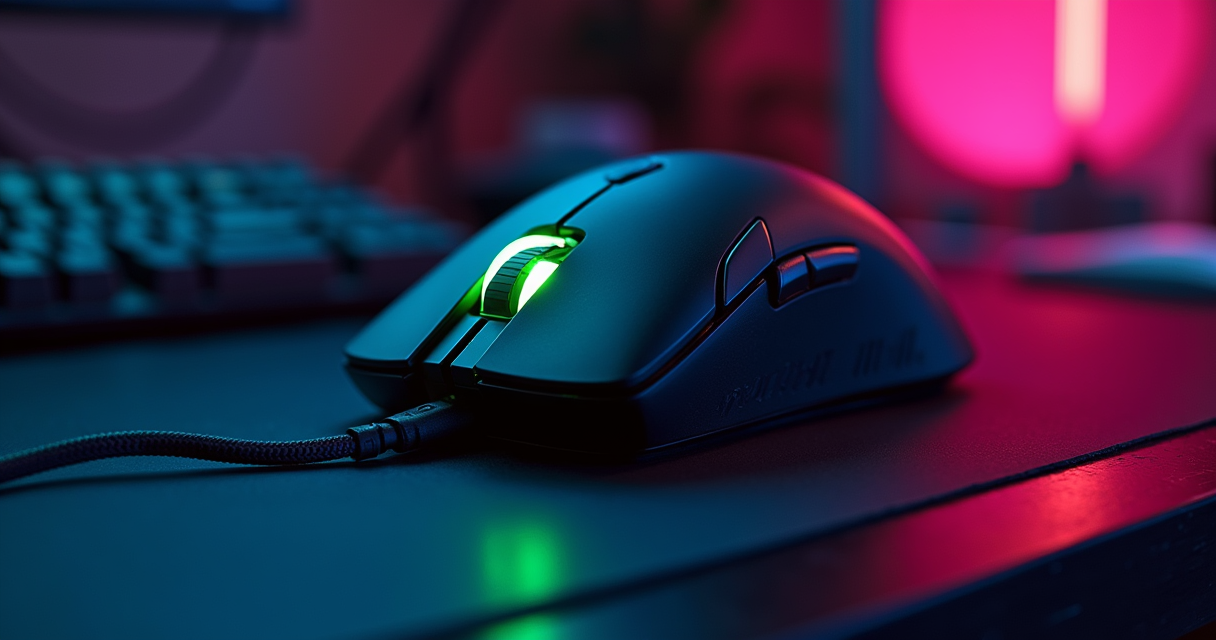
There is a specific kind of person who spends 159 dollars on a mouse and then immediately sets it to 800 DPI — the exact sensitivity a Counter-Strike 1.6 player ran in 2004 on a ball mouse that cost nine dollars and smelled of desk. That person is not confused. That person is correct, and this review is written for them. Everyone else — the buy-the-biggest-number crowd who reads 44,000 DPI on a box and feels something — is welcome to stay, but you are going to be told things you do not want to hear.
The question in front of us is deceptively narrow: what is the best gaming mouse for FPS in 2026? The 2026 press has already answered it, more or less in unison, and this review exists to interrogate that consensus rather than parrot it. We spent weeks with the winner, benched it against the challengers, and dragged the whole conversation back through thirty years of first-person-shooter history — because a retro-gaming site does not get to talk about aiming devices without acknowledging that the entire discipline was invented by a man playing Quake for a Ferrari. So: the verdict first, then the argument, then the receipts.
The Verdict, Up Front
We do not bury verdicts here. It insults your time and it insults the product. If you take one paragraph away from three thousand words, take this one.
The one-sentence answer
The best FPS mouse of 2026 is the Logitech G Pro X Superlight 2, and it is not particularly close for most players. It weighs roughly 60 grams, costs 159 dollars, and has been endorsed as the best FPS pick by an almost suspicious number of independent outlets in the same twelve months. Tom's Hardware hands it the flat-out 'Best FPS Gaming Mouse' slot. Empire's 2026 guide calls it the best FPS mouse and explicitly ties FPS performance to mouse hardware more than any other genre. The specialist site fpsaim lists it as 'Best overall' at 159 dollars. Cosmic Games Hub ranks it #1 overall at roughly 159 dollars and 61 grams. When the aggregator sites, the enthusiast press, and the mainstream tech outlets all land on the same object, the burden of proof shifts to whoever disagrees.
The rating, and what it means
We score it 9 out of 10. That is not a participation medal; it is a deliberately withheld tenth point, and the section at the bottom explains exactly what Logitech would have to do to earn it. A 9 here means: this is the correct default, it will not embarrass you at any level of play from bronze to LAN main-stage, and the only mice that beat it beat it on a single axis — usually raw weight — rather than across the board. The Superlight 2 is the mouse you buy when you are done thinking about mice, which for a competitive-FPS tool is the highest possible compliment.
Who can stop reading now
If you play ranked Valorant, Counter-Strike 2, Apex Legends, Overwatch 2, or any tactical or arena shooter, and you want to buy once and forget it, close the tab and buy the Superlight 2. You are done. Keep reading only if you have big hands and want ergonomics, if you are chasing the last two grams, if 159 dollars is genuinely out of reach, or if you enjoy watching a reviewer explain why the obvious answer is the right answer. That last category is the whole point of the rest of this piece.
A Short History of the FPS Mouse
You cannot evaluate an FPS mouse without understanding that the FPS mouse is a historical accident — a general-purpose office pointer that a subculture bent, over three decades, into a precision aiming instrument. The Superlight 2 is the current end-state of that bending. To know why 60 grams and 800 DPI is the answer, you have to know how we got here.
From Engelbart's block of wood to the ball mouse
The mouse began as a wooden shell with two perpendicular metal wheels, demonstrated by Douglas Engelbart in 1968 at what history politely calls 'The Mother of All Demos.' For twenty-five years it was an office device — a way to click on spreadsheets. The computer mouse that most 1990s gamers actually owned was a ball mouse: a rubber-coated steel ball spinning two slotted encoder wheels, accumulating lint, requiring you to pop the ring off and scrape gunk from the rollers every few weeks. It had no concept of DPI in the modern sense, drifted when the ball was dirty, and skipped when you flicked too fast. And people won tournaments with it anyway, because the software demands were about to catch up with — and then wildly overtake — the hardware.
Quake, mouselook, and Carmack's Ferrari
The FPS mouse was born in 1996 with id Software's Quake and the mainstreaming of mouselook — using the mouse to aim freely in a fully 3D space rather than shuffling with arrow keys. Doom had gestured at it; Quake made vertical, analog, mouse-driven aim the default language of the genre, and nothing has fundamentally changed since. The cultural exclamation point came in 1997, when Dennis 'Thresh' Fong won the Red Annihilation Quake tournament and drove home John Carmack's Ferrari 328 as the prize. It is the founding myth of competitive FPS, and the quiet detail that matters for this review is that Thresh's edge was partly configuration — a keyboard-and-mouse setup, low sensitivity, full-arm aim — the same fundamentals a Radiant Valorant player uses today on a Superlight 2. The tool got lighter. The physics of a human wrist did not.
The sensor wars and the weight religion
The 2000s were the optical revolution: the ball died, and photodiode-plus-LED sensors ended the lint era. Manufacturers then spent fifteen years fighting a spec war — laser sensors that introduced acceleration artifacts, ever-higher DPI ceilings nobody used, RGB for its own sake — before the enthusiast community forced a correction. By the late 2010s the consensus had inverted: the best sensor is the one you cannot feel (flawless tracking, no smoothing, no acceleration), and the best weight is the lowest one that does not compromise the shell. Honeycomb-shelled sub-60-gram mice went from fringe mods to mainstream products. The Superlight 2 is the establishment's polished answer to that fringe: all of the weight savings, none of the holes. Every mouse in this review is a descendant of that correction — the moment the industry stopped selling numbers and started selling the absence of interference.
What Actually Makes an FPS Mouse
Before we bench the winner against its rivals, we need a shared rubric — because most 'best mouse' arguments are people weighting different variables and not saying so. For FPS specifically, four things matter, roughly in this order: weight, latency, shape, and switches. Everything else on the box is marketing.
Weight, and the cult of the gram
Weight is first because it is the variable you feel on every single micro-adjustment, thousands of times per session. A lighter mouse lowers the effort of a flick and reduces the fatigue that degrades your aim in hour three of a ranked grind. The industry crossed a psychological line when flagships dropped under 65 grams; the Superlight 2 (about 60 grams) and the Razer Viper V3 Pro (54 grams) both live comfortably below it. Diminishing returns are real — the gap between 70 and 60 grams is obvious, the gap between 60 and 54 is a preference, and anyone claiming a 6-gram difference doubled their K/D is selling something. Weight matters most; it also saturates fastest.
Sensor, polling, and the latency you can't feel
Here is where the industry lies to you politely. Modern flagship sensors — Logitech's HERO 2, Razer's Focus Pro line — are all effectively flawless: no acceleration, no smoothing, tracking speeds and DPI ceilings far beyond human relevance. The Superlight 2's spec sheet lists a 44,000-DPI ceiling; the Viper V3 Pro claims 35,000; the DeathAdder V4 Pro claims 45,000. These numbers are a contest to print the biggest integer. You will run 800. The genuinely interesting 2026 development is polling rate: 8,000 Hz wireless is now standard on these flagships, up from 1,000 Hz. It is real, it is measurable, and it costs you battery life and a non-trivial slice of CPU overhead for a difference most players cannot perceive. Your monitor is a bigger lever than your polling rate — which is exactly why we keep arguing that 144Hz still wins the refresh-rate debate in 2026 on a 2.77ms margin, and why chasing 8,000 Hz before you have sorted your display and your VRR setup is optimizing the wrong end of the pipeline. Latency between the good mice is a rounding error. Spend the attention elsewhere.
Shape, switches, skates, and the settings that matter
Shape is the most personal variable and the one no reviewer can decide for you: symmetrical (Superlight 2, Viper) suits claw and fingertip grips and smaller hands; ergonomic (DeathAdder) suits palm grips and larger hands. Switches determine click feel and, increasingly, click latency — optical and hybrid designs (Logitech's LIGHTFORCE, Razer's optical Gen-4) have largely killed the double-click failures that plagued a decade of mice. Skates (feet) are the cheap upgrade nobody mentions: virgin-PTFE feet on a control-weave pad change the mouse more than a DPI change ever will. And the settings? They are boring and unchanging, which is the point. Here is the baseline every competitive player converges on, give or take a preference:
# The Machine's baseline competitive FPS config
# (Logitech G Pro X Superlight 2, via G HUB)

DPI                800        # pro standard; sensor tracks native, zero interpolation
Polling rate       1000 Hz    # 8000 Hz exists; you will not feel it, it eats battery
In-game sens       0.35-0.55  # Valorant example range
eDPI = DPI x sens = 320       # 800 x 0.40 -> low-and-wide, full-arm aim
Lift-off distance  ~1 mm      # keep it low; HERO 2 handles it
Surface            cloth pad  # large control-weave mat, not a hard pad
Onboard profile    1 saved    # so a tournament PC needs no software
eDPI — effective DPI, your DPI multiplied by in-game sensitivity — is the only number worth comparing between players, and the competitive range sits roughly between 200 and 400 for tactical shooters. A pro on 800 DPI and 0.40 sens (eDPI 320) and a pro on 1600 DPI and 0.20 sens (also 320) are aiming identically. The mouse's job is to get out of the way of that math. The Superlight 2's job, specifically, is to do it at 60 grams for 95 hours on a charge.
The Superlight 2, In Detail
Enough theory. This is a play-through review, so here is what living with the Superlight 2 is actually like — the parts the spec sheet cannot tell you.
In the hand
The shape is the old G Pro Wireless lineage, refined: a low, symmetrical hump, gently flared sides, no left-side thumb buttons on the right-hand orientation you will actually use. It is a safe shape — safe in the way a Toyota is safe, which is to say it fits the widest range of hands with the fewest complaints and inspires zero poetry. Claw and fingertip grippers will be immediately at home; palm grippers with large hands will find it a touch small and should read the DeathAdder section below. About the weight: Logitech's own spec sheet says 60 grams, while several of the 2026 buyer's guides that crown it — Cosmic Games Hub among them — round to 61. We flag the discrepancy because we noticed it, not because it matters: either figure is comfortably under the 65-gram line where a mouse stops feeling like it has mass of its own. It does not feel hollow or creaky doing it, which is the trick the honeycomb crowd never fully solved.
The sensor and the LIGHTFORCE click
The HERO 2 sensor is, functionally, invisible — which is the entire goal. Across weeks of play we never once caught it smoothing, accelerating, or spinning out on a fast flick. It tracks what your hand does and nothing else. The LIGHTFORCE main switches are a hybrid optical-mechanical design, and they land the compromise well: a crisp, tactile click that feels mechanical, backed by optical actuation that sidesteps the debounce-and-double-click rot that killed so many mice from the 2010s. The clicks are light without being twitchy, which matters when you are tapping single rifle shots for two hours. The scroll wheel is unremarkable in the best sense — defined steps, no free-spin gimmick to go wrong.
Wireless, battery, and the dongle you'll lose
LIGHTSPEED wireless is the quiet triumph here. There is no perceptible penalty versus a cable; the debate ended years ago and wireless won. Battery life is rated up to 95 hours at 1,000 Hz, which in practice means you charge it roughly weekly and never think about it — and the USB-C port (finally standard, after Logitech's long micro-USB stubbornness) means you charge and keep playing with any cable in the house. The catch, and it is a real one: if you enable 8,000 Hz polling, battery life collapses toward the ~20-hour range, turning a weekly charge into a near-daily one for a difference you will struggle to feel. Our advice is to leave it at 1,000 Hz and forget the option exists. The other catch is eternal and applies to every wireless mouse ever made: you will eventually lose the tiny USB receiver. Logitech at least stows it in the mouse; use that slot religiously.
Full Specifications
Here is the full accounting. We have mapped the traditional review categories — platform, year, size, controls, storage, licensing — onto a peripheral, because a mouse is a device with an operating system, a save state, and a license agreement whether it advertises them or not.
The spec sheet
| Specification | Logitech G Pro X Superlight 2 |
|---|---|
| Category | Wireless symmetrical FPS mouse |
| Released (year) | 2023 (still the 2026 benchmark pick) |
| Sensor | Logitech HERO 2 (optical) |
| Max DPI (claimed) | 44,000 — meaningless; run 800 |
| Weight | ~60 g (61 g in some 2026 listings) |
| Dimensions (size) | ~125 x 63.5 x 40 mm |
| Shape | Symmetrical, right-hand-biased, no side buttons |
| Main switches | LIGHTFORCE hybrid optical-mechanical |
| Controls (buttons) | 5 programmable |
| Connectivity (platform link) | LIGHTSPEED 2.4 GHz + USB-C (wired/charge) |
| Polling rate | Up to 8,000 Hz (1,000 Hz recommended) |
| Battery (rated) | Up to 95 hr at 1,000 Hz; ~20 hr at 8,000 Hz |
| Feet | PTFE |
| Onboard memory (save) | 1 profile stored on-device |
| Software (license) | Logitech G HUB (proprietary, closed-source) |
| Platform (OS) | Windows, macOS; plain HID elsewhere |
| Warranty | 2-year limited (Logitech) |
| Price (MSRP) | $159 |
What the numbers hide
Two rows deserve a footnote. The 'onboard memory: 1 profile' line is the single most underrated spec on the sheet for competitive players: it means your DPI and polling settings live on the mouse itself, so when you plug it into a locked-down tournament PC that will not let you install G HUB, your 800 DPI travels with you. And the '44,000 DPI' line is there purely so you can see how absurd the spec war has become — that ceiling is 55 times the setting a professional will actually use. When we say the mouse's job is to get out of the way, this table is the proof: the numbers that matter (weight, battery, onboard save) are quietly excellent, and the number that is loud (DPI) is quietly irrelevant.
Six Ways It Plays
A mouse is not experienced as a spec sheet; it is experienced across wildly different play patterns. We tested the Superlight 2 as six different players. Here is who it serves and how well.
The casual and the ranked climber
For the casual — the Saturday-night Call of Duty or Battlefield player who is not chasing a rank — the honest truth is that the Superlight 2 is more mouse than you strictly need, and it will still be a joy. Nothing about it punishes casual use; it is light, comfortable, and wireless, and the 159-dollar price is the only thing standing between it and a universal recommendation. If that number stings, jump to the budget section — but if you can absorb it, you will never wonder whether your gear is holding you back. For the ranked climber — the completionist grinding a battle pass and a rank ladder simultaneously, playing four hours a night to hit Radiant or Global — this is the mouse's home turf. The 60-gram weight is the difference between fresh aim and fatigued aim in hour four, and the roughly weekly charge cycle means the mouse is never the reason a session ends. This is the player the whole design targets, and it shows.
The aim-trainer and the co-op anchor
For the aim-trainer and movement-shooter speedrunner — the Kovaak's-and-Aim-Lab devotee, the Apex and Titanfall movement obsessive chasing frame-perfect flicks — the Superlight 2 delivers the one thing that discipline requires: consistency. Every flick lands the same because the sensor never editorializes and the weight never fights you. It is not the absolute lightest option (see the Viper), but it is light enough that the bottleneck becomes your wrist, which is where the bottleneck belongs. Feed it the frames it deserves; a mouse this precise is wasted on a stuttering rig, which is one more reason the GPU that pushes those frames is part of the aiming pipeline, not separate from it. For the co-op anchor — the duos and trios player, the support main holding an angle while the squad pushes — the story is reliability and endurance. Long co-op sessions are where cheap mice reveal double-click faults and dying batteries; the LIGHTFORCE switches and the 95-hour rating simply do not give you those problems. You become the teammate whose gear never causes the wipe.
The LAN traveler and the retro crossover
For the LAN traveler — the player who takes their setup to tournaments and events — the onboard profile is the killer feature, as covered above: your settings survive a strange, locked PC. Pack the receiver in its slot, pack a short USB-C cable as insurance, and the mouse is genuinely event-ready. Wireless at a LAN used to be a superstition (interference fears); in 2026 it is a non-issue, and if your bottleneck is online lag rather than local play, that is a network problem — a better router will do more for your ping than any mouse ever will. Finally, for the retro crossover — the reason a retro site is even reviewing this — the Superlight 2 is a revelation on the classics. Load up original Quake, Half-Life, or a source port of GoldenEye with mouse aim enabled, and a modern flawless sensor turns games designed around imprecise ball mice into something almost unfair. Aiming in 1996 was a struggle against your own hardware. Aiming in those same games in 2026, on this mouse, is the struggle those levels were secretly designed for and never got. It is the closest thing to time travel a peripheral can offer.
The Competition
The Superlight 2 wins, but it does not win uncontested, and pretending otherwise would be exactly the promotional fluff this site refuses to print. Three rivals genuinely matter, and each beats the Logitech on one specific axis.
Comparison table
| Mouse | Weight | Sensor / Max DPI | Connectivity | Buttons | Price (2026) | Best for |
|---|---|---|---|---|---|---|
| Logitech G Pro X Superlight 2 | ~60 g | HERO 2 / 44,000 | LIGHTSPEED + USB-C | 5 | $159 | Best overall FPS |
| Razer Viper V3 Pro | 54 g | Focus Pro 35K Gen-2 / 35,000 | HyperSpeed + USB-C | 8 | $129.99–$159.99 | Lightest pro pick |
| Razer DeathAdder V4 Pro | 56 g | Focus Pro 45K Gen-2 / 45,000 | HyperSpeed + USB-C | 8 | $169.99 | Ergonomic / big hands |
| Logitech G PRO X2 Superstrike | n/a (see text) | Advanced click tech | LIGHTSPEED | 5 | $179.99 | Bleeding-edge clicks |
| Logitech G502 Hero | 121 g | HERO 25K / 25,600 | Wired USB | 11 | $30–$45 | Budget wired / crossover |
| Logitech G305 / G304 | 99 g | HERO 12K / 12,000 | LIGHTSPEED (1x AA) | 6 | $59.99 | Budget wireless fallback |
Razer Viper V3 Pro — the 54-gram challenger
The Viper V3 Pro is the one rival that beats the Superlight 2 on the variable that matters most: weight. At 54 grams it is the lighter mouse, full stop, and both fpsaim and KeyboardTester point to it as the pick 'if you want something lighter,' with KeyboardTester going further and calling it the 'safest pro-validated FPS pick.' It is also frequently cheaper — 129.99 on sale against a 159.99 list — and its symmetrical shape is a hair flatter and longer, which some fingertip grippers strongly prefer. So why is it the runner-up and not the winner? Because 'safest pick' and 'lightest' are not the same as 'best default,' and the Superlight 2's shape suits more hands, its ecosystem is more mature, and the 6-gram weight gap is a genuine preference rather than a genuine advantage. If you have handled a Viper and loved the shape, buy the Viper with our blessing. For the median player picking blind, the Logitech is the safer landing.
DeathAdder V4 Pro — the ergonomic flagship
Every mouse above is a symmetrical shape, and symmetrical shapes are a problem if you have large hands and palm-grip. The Razer DeathAdder V4 Pro is the answer: KeyboardTester tags it the ergonomic flagship at 169.99, and it is genuinely remarkable that Razer got this larger, contoured, palm-filling shell down to 56 grams — for years, ergonomic meant heavy, and the DeathAdder V4 Pro breaks that rule. It launched in July 2025 with a 45,000-DPI sensor (again: a number you will never use) and a 150-hour battery rating that comfortably out-endures the Logitech. If your hand drapes over a mouse rather than perching on it, this is very likely your correct answer, and its exclusion from the top slot is purely about shape prevalence, not quality.
The budget anchors and the click-tech wildcard
Two Logitechs anchor the bottom of the market. The G305/G304 is KeyboardTester's budget wireless fallback at 59.99 — 99 grams, a proven HERO sensor, and an astonishing 250-hour run on a single AA battery, which is its party trick and its liability (it is heavier because of that AA). The G502 Hero is the other pole: SpecPicks argues it is still the best overall pick for the broadest audience, citing its HERO 25K sensor, 121-gram body, and eleven buttons at 30 to 45 dollars. It is heavy and wired and nobody's FPS-purist choice, but it is a tank that does everything, and for a player who plays as much MMO and MOBA as shooter, those eleven buttons earn their keep. The wildcard is the Logitech G PRO X2 Superstrike at 179.99, which KeyboardTester flags as the more advanced click-technology option — the bleeding edge of what a mouse click can be, and priced accordingly. It is a curiosity for early adopters, not a default.
Pricing and Availability
Prices below are the 2026 figures our sources report. As always, treat MSRP as a ceiling and sale prices as the real market — mice in this class go on sale constantly.
What you'll actually pay
| Model | Price (2026) | Source | Notes |
|---|---|---|---|
| Logitech G Pro X Superlight 2 | $159 | fpsaim / Cosmic Games Hub | The consensus best-FPS pick |
| Razer Viper V3 Pro | $129.99 sale / $159.99 list | KeyboardTester | Lighter challenger, 54 g |
| Razer DeathAdder V4 Pro | $169.99 | KeyboardTester | Ergonomic flagship |
| Logitech G PRO X2 Superstrike | $179.99 | KeyboardTester | Advanced click technology |
| Logitech G305 / G304 | $59.99 | KeyboardTester | Budget wireless fallback |
| Logitech G502 Hero | $30–$45 | SpecPicks | Budget wired, 11 buttons |
The 2026 wildcard: FrameSync and the feature war
Here is the thing that complicates any 2026 buying advice: the category is moving again. PC Gamer argues 2026 is 'shaping up to be a golden year for gaming mice,' pointing specifically at Razer's battery-boosting FrameSync additions — evidence that the innovation front has shifted from weight and shape (largely solved) to firmware and features. That is a reason to buy with your eyes open, not a reason to wait: the fundamentals of a great FPS mouse are settled, and a firmware feature that extends battery life does not obsolete a 60-gram flagship that already lasts 95 hours. Buy the mouse that is great now; the feature war is gravy, not a reason to sit on your hands for a year.
Buying advice
Cross-reference before you check out. The 2026 roundups worth your time are RTINGS' data-driven 'Best Gaming Mouse of 2026', PCMag's tested-picks page, and Tom's Guide, which — tellingly — still maintains a distinct 'best gaming mouse for FPS' category in 2026, proof that FPS-specific buying advice remains its own discipline. When the lab-measurement site, the mainstream tech press, and the enthusiast outlets converge, buy the convergence. They have converged on the Superlight 2.
Who Should Buy What
One mouse is not right for everyone, and a review that pretends otherwise is useless. Here are the concrete recommendations, by player.
If you play ranked (and if you have big hands)
Best overall FPS / ranked tactical shooters: the Logitech G Pro X Superlight 2 at 159 dollars. This is the default, endorsed across the board, and the mouse you buy to stop thinking about mice. If you have large hands or palm-grip: the Razer DeathAdder V4 Pro at 169.99 — the ergonomic flagship that somehow weighs 56 grams. Symmetrical shapes fight big palm-grippers; this one does not. If you want the absolute lightest pro-validated option: the Razer Viper V3 Pro at 54 grams, 129.99 on sale — the challenger that wins the weight axis outright, and KeyboardTester's 'safest pro-validated FPS pick.'
If you're on a budget (wireless vs wired)
Best budget wireless: the Logitech G305/G304 at 59.99. You give up the sub-60-gram weight (it is 99 grams with its AA battery) but you keep a genuinely good HERO sensor, LIGHTSPEED wireless, and a 250-hour battery. It is the honest floor of acceptable competitive wireless. Best budget wired / do-everything: the Logitech G502 Hero at 30 to 45 dollars — SpecPicks' broadest-audience pick, with 11 buttons for players who split time between shooters, MMOs, and MOBAs. It is heavy and it is corded, but it is nearly indestructible and costs a quarter of the flagship.
If you want the bleeding edge (and if you already own a good mouse)
If you want the newest click technology: the Logitech G PRO X2 Superstrike at 179.99, the advanced-click wildcard for early adopters who want to feel the future and do not mind paying a premium to beta-test it. If you already own a recent flagship — a first-gen Superlight, a Viper V2, a DeathAdder V3 — the honest recommendation is to keep it. The 2026 improvements are real but incremental, and the money is better spent on the parts of your setup that are actually holding you back. A great mouse feeding a mediocre display and a laggy connection is a Ferrari on a dirt road. Fix the road.
Pros and Cons
The ledger, stated plainly.
What it gets right
- Weight: ~60 grams, under the psychological line, without a hollow or creaky shell.
- Sensor: HERO 2 is functionally invisible — no smoothing, no acceleration, no drama.
- Switches: LIGHTFORCE hybrid clicks are crisp and, crucially, resistant to the double-click rot that killed a decade of mice.
- Wireless and battery: LIGHTSPEED is indistinguishable from wired; 95 hours at 1,000 Hz means near-zero charge anxiety.
- USB-C, at last: Logitech finally abandoned micro-USB. Charge with any cable.
- Onboard profile: your 800 DPI travels to any locked tournament PC without software.
- Consensus: endorsed as best-FPS by Tom's Hardware, Empire, fpsaim, and Cosmic Games Hub in the same year.
What it gets wrong
- Price: 159 dollars is a lot, and the Viper V3 Pro is often cheaper and lighter.
- Shape prevalence: the safe symmetrical shell suits most hands but excites none, and it is a touch small for large palm-grippers.
- 8,000 Hz is a trap: enabling it craters battery life (~20 hours) for a difference you likely cannot feel.
- Five buttons only: fine for pure FPS, limiting if you also play MMOs or MOBAs.
- Closed software: G HUB is proprietary and occasionally clunky; there is no open-source path.
The asterisks
Two caveats keep this from being a blank-check recommendation. First, the weight discrepancy (Logitech's 60 grams versus retail listings' 61) is trivial but symptomatic of an industry that treats its own numbers casually — trust the feel, not the sticker. Second, the 8,000 Hz polling feature is marketed as an upgrade and functions, for most people, as a battery-drain toggle; the fact that a flagship's headline feature is one you should leave off tells you something about where the spec war has gone. Neither sinks the mouse. Both are worth knowing before you pay.
Final Verdict: 9/10
We started with the verdict and we will end by defending the exact number.
The score
9 out of 10. The Logitech G Pro X Superlight 2 is the best gaming mouse for FPS in 2026 for the largest number of players, and the near-unanimous 2026 press agrees. It nails every variable that matters — weight, sensor, switch reliability, wireless, battery, onboard save — and its only losses are to single-axis specialists: the Viper V3 Pro on raw grams, the DeathAdder V4 Pro on ergonomic shape, the budget Logitechs on price. When a product's worst-case outcome is 'a rival beats it on one thing you might not even care about,' you are looking at a 9.
What would make it a 10 (or a 7)
The withheld point is not arbitrary. To reach a 10, Logitech would need to close the weight gap with the 54-gram Viper without inflating the price, ship a second shape (a larger ergonomic variant) so the recommendation stopped requiring a Razer footnote, and either make 8,000 Hz polling free of the brutal battery penalty or stop marketing it as a headline. Do those three things and this is a 10 and the conversation ends. Conversely, it would fall to a 7 only if the price climbed while the Viper stayed cheaper and lighter — value is the one flank where it is genuinely exposed.
The Machine's bottom line
Thirty years ago, Dennis Fong won a Ferrari aiming with a ball mouse and a low-sensitivity config, and the lesson has never changed: the fundamentals live in your arm, and the tool's only job is to disappear. The Superlight 2 is the most completely disappeared mouse you can buy in 2026 — 60 grams of expensive, well-earned consensus that will never once be the reason you missed. Pair it with the display and peripherals that actually gate your aim — a fast panel, a decent connection, a keyboard like the one we crowned in our 2026 gaming-keyboard review — and the mouse becomes the last thing you have to think about. That is worth 159 dollars, and it is worth nine points out of ten. Buy it, set it to 800, and go aim.
Questions the search bar asks me
- What is the best gaming mouse for FPS in 2026?
- The Logitech G Pro X Superlight 2, at roughly $159 and about 60 grams. It is named the best FPS mouse by Tom's Hardware and Empire, listed 'Best overall' by fpsaim, and ranked #1 overall by Cosmic Games Hub — the most consistently repeated pick across 2026 roundups.
- Is the Razer Viper V3 Pro better than the G Pro X Superlight 2?
- Only on weight. The Viper V3 Pro is lighter at 54 grams versus the Logitech's ~60, is often cheaper ($129.99 sale / $159.99 list), and KeyboardTester calls it the 'safest pro-validated FPS pick.' But the Superlight 2's shape suits more hands, so it remains the better blind default for most players.
- What DPI should I use for FPS?
- 800 DPI is the long-standing pro standard, paired with an in-game sensitivity that lands your eDPI (DPI x sens) roughly between 200 and 400 for tactical shooters. The Superlight 2's 44,000-DPI ceiling is a marketing number — no competitive player uses more than a tiny fraction of it.
- Do I need 8,000 Hz polling for FPS?
- No. 1,000 Hz is plenty, and on the Superlight 2, enabling 8,000 Hz drops battery life from ~95 hours toward ~20 for a difference most players cannot perceive. It is real technology — PC Gamer calls 2026 a 'golden year' for mouse firmware features — but it is gravy, not a requirement.
- What's the best budget FPS mouse?
- For wireless, the Logitech G305/G304 at $59.99 (KeyboardTester) — a good HERO sensor and a 250-hour AA battery, at the cost of extra weight (99 g). For wired do-everything, the Logitech G502 Hero at $30–$45 (SpecPicks), with a HERO 25K sensor and 11 buttons.

Ben covers the hardware end of retro gaming: FPGA cores, real-cartridge dumping, capture setups, CRT vs scaler workflows, and the legal and physical preservation infrastructure that keeps old games playable. Every post under this byline is reviewed pre-publish by Sam P., Editor & Operator — corrections to info@instalinkoteam.com. Published 2026-08-29 · Last updated 2026-08-29. Full bios on the author page.